
How Twenty20 Systems Migrated Memorial Sloan Kettering’s IBM DataPower Estate to Workato in 5 Weeks
July 13, 2026
Sales Call Scoring, Automated: Sales Call Analysis Genie
September 8, 2026How Twenty20 Systems Migrated Memorial Sloan Kettering’s IBM DataPower Estate to Workato in 5 Weeks
July 13, 2026Sales Call Scoring, Automated: Sales Call Analysis Genie
September 8, 2026
MuleSoft to Workato Migration: Rebuilding Enterprise Scheduling APIs for a Leading US Health Insurance Provider
A member opens a portal, picks a time, and books an appointment. That single tap starts a chain reaction. A scheduling platform has to release an open slot and return a confirmation the member can see straight away. Salesforce has to create an appointment record without duplicating one that already exists. Marketing Cloud has to send a confirmation to the right person with the right reschedule link. A field service system has to know which agent is now committed.
Scheduling looks like a feature. It behaves like an orchestrator. No single system owns a booking end to end, so something has to sit above all of them, decide what happens in what order, hold the outcome together when one participant is slow, and return a single answer to the member. That coordinating role is the platform. Everything else is a participant in it.
For a leading US health insurance provider, that orchestration ran on MuleSoft. It worked. It was also expensive to change, and every new scheduling scenario added more bespoke logic to maintain.
The platform was migrated to Workato. Every capability survived the move. What went away was the duplication underneath it. Below is what the migration involved, and, at each decision point, what it changes for the business rather than only for the engineering team.
Why a stable platform still needed to move
Stability was never the issue. The cost of the next change was.
The scheduling estate spanned Cal.com, Salesforce, Salesforce Field Service, Salesforce Marketing Cloud, the Core Member API, the Partner Scheduling Platform, and the Enterprise Data Platform, with three different authentication models across them. Every new endpoint meant re-implementing the same groundwork: acquire a credential, validate an input, transform a payload, catch a failure, shape a response.
The design set out what the replacement had to deliver. Reproduce the existing workflows with equivalent functionality, performance, and fault tolerance. Publish them as real-time REST APIs on the Workato API platform. Centralize logging and error handling across every call. Route to multiple scheduling endpoints with minimal duplication. Return a unified response structure and a consistent schema across the estate. Reduce technical debt so the framework stays low-maintenance as it grows.
Read as a set, those are one objective stated six ways: stop rebuilding the same groundwork for every endpoint.
That matters commercially, not just technically. Integration debt sets the ceiling on how fast an organization can launch anything member-facing. A new self-service journey, a new outreach programme, a new scheduling channel: each one arrives at the same middleware and waits. That is the real reason a stable platform gets replaced. Not because it broke, but because it had started to price every future decision.
Workato's API platform answered that through reusable recipes, published API endpoints, callable child recipes, and centralized logging. The team stopped maintaining a codebase and started reusing a set of patterns.
What we built: one orchestration layer, many backends
The migrated solution follows a layered architecture:
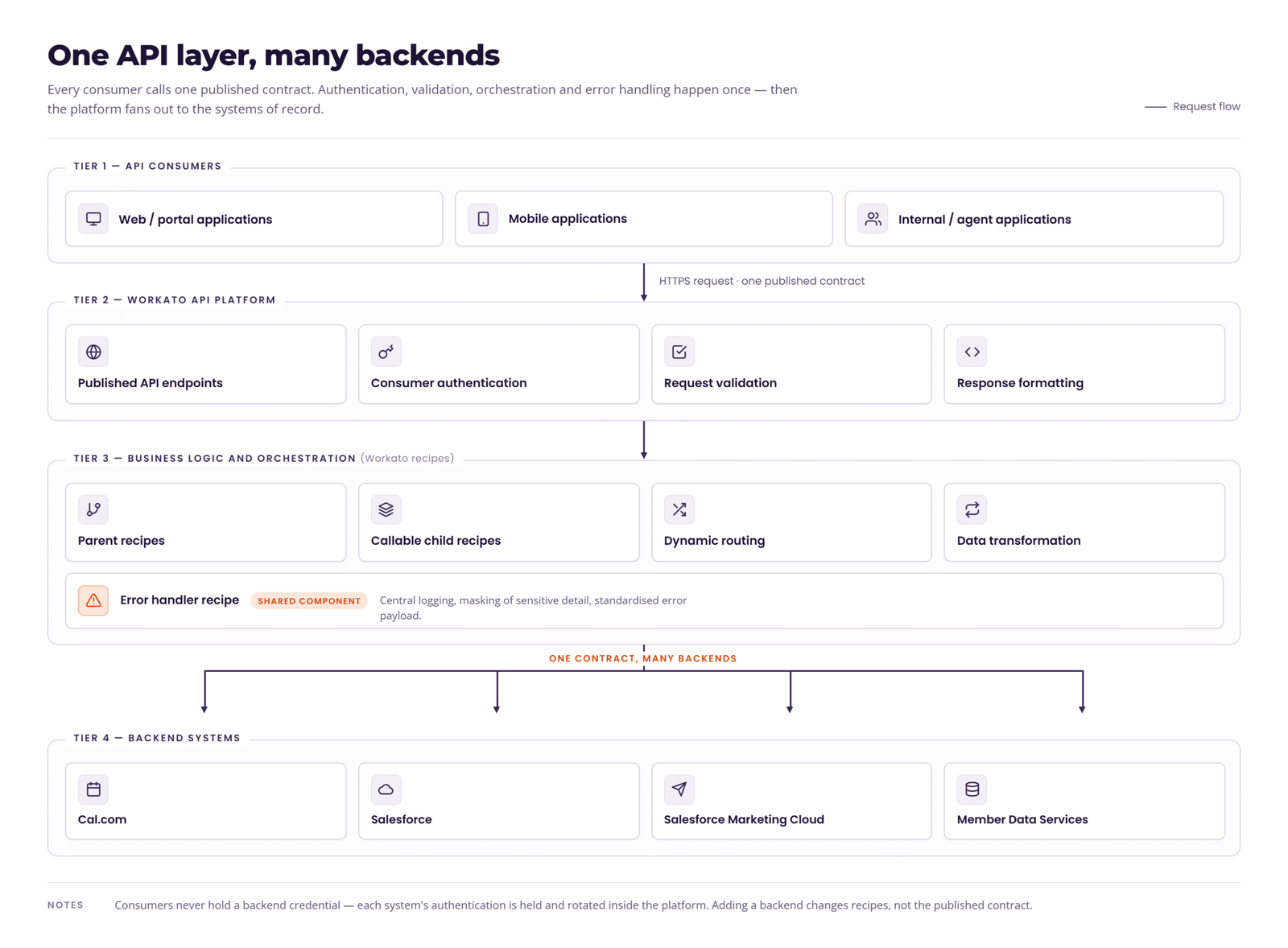
Workato now owns the work that used to be scattered across the estate: request validation, authentication, data transformation, dynamic routing, API orchestration, error handling, logging, and response formatting.
The commercial consequence of that separation is decoupled roadmaps. Consumer applications talk to one contract, so the portal team, the mobile team, and the agent desktop team no longer have to synchronize releases with whatever is happening behind the API. Backend systems can be changed, replaced, or added without a client-side release, which means a platform decision stops being a cross-departmental negotiation.
Three authentication models behind one contract
Each backend keeps its own scheme, managed as a Workato connection rather than as code inside every recipe. Credential handling stops being a per-endpoint concern. A token refresh failure gets fixed in one connection instead of triaged across every flow that uses it, which converts a recurring class of production incident into a single point of control. It also removes a quiet staffing risk: credential logic buried in bespoke code is usually understood by one person.
40 endpoints, published and governed as one platform
The migration covered the full scheduling lifecycle across twelve workflow groups: user administration, slot availability, booking management, appointment event processing, event types, teams, memberships, appointment retrieval, community-based services, self-service scheduling, enterprise scheduling, and partner appointment services. Thirty-eight published operations in total.
That number matters for one reason. Thirty-eight endpoints built the old way is thirty-eight places to get authentication, validation, error shaping, and logging slightly different. Thirty-eight endpoints published on the Workato API platform is one contract, one credential store, one error format, and one monitoring surface. The scale that used to compound maintenance cost now compounds reuse instead.
The Workato API platform is doing the work that would otherwise be spread across custom code:
- Published REST API endpoints give consumer applications a single governed front door for every scheduling operation.
- Reusable recipes and callable child recipes mean shared behaviour, such as appointment ingestion or notification dispatch, is written once and invoked from anywhere it is needed.
- Dynamic routing lets one endpoint resolve to whichever backend owns the record, so the caller never has to know.
- Centralized error handling and logging produce a consistent response shape and a single place to investigate an incident.
- Managed connections hold each backend credential outside the recipes that use it.
- Job reports, alerts, and periodic health checks cover endpoint health, connection validity, and recipe performance.
Every capability group follows the same underlying recipe pattern: API trigger, validation, backend invocation, response transformation, error handling. That repetition is the point. A platform an unfamiliar engineer can read is a platform that survives turnover, absorbs contractors, and can be handed to a managed service without a rebuild.
Lifecycle operations are also wired to real business events rather than exposed for their own sake. A new employee created in the HR or CRM system initiates the creation of a scheduling profile. A departure removes one, which is an access-control matter as much as a data one. Booking creation returns the booking ID, status, start and end time, and organizer details in the same response, so the calling application renders a confirmation without a second round trip, and the member sees a result instead of a spinner.
How it works: the patterns that did the heavy lifting
Parallel fan-out for appointment events
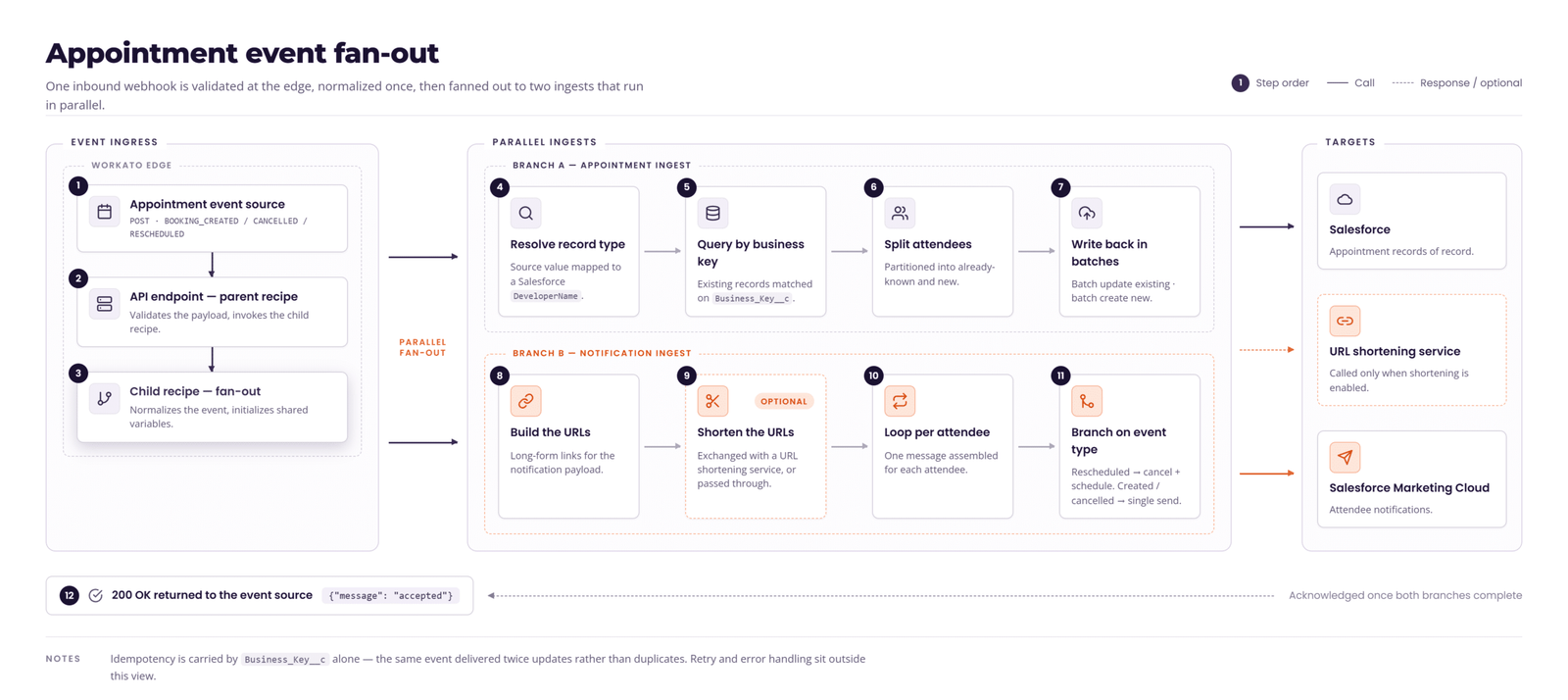
Appointment events arrive at a Workato API endpoint as an HTTP POST from Cal.com or another external system, carrying one of three event types: booking created, booking cancelled, or booking rescheduled.
The parent recipe performs basic payload validation, invokes a callable child recipe, and returns 200 OK to the caller to acknowledge the event. Acknowledging the event rather than holding the connection open for every downstream write is what keeps a slow backend from turning into a caller-side timeout.
The child recipe acts as the central orchestration layer. It normalizes event attributes including event type and record type, initializes shared variables for the appointment UID and an attendee counter, then invokes two downstream workflows in parallel on the same payload. One booking event, two systems updated, one acknowledgement to the caller.
The Salesforce appointment ingest workflow creates and maintains appointment records in Salesforce. It parses the event payload, extracts appointment metadata and attendee details, and generates a unique business key per attendee from the appointment UID and a counter to ensure idempotency. Idempotency here is a member-experience control, not a technical nicety: a replayed event that creates a second appointment record risks a second confirmation, a double-committed agent calendar, and inaccurate reporting on that object. The record type is normalized to Salesforce DeveloperName values, Salesforce is queried to resolve the correct record type and to identify existing Event records by business key, and attendees are then split into two streams, existing appointments updated in batch and new appointments created in batch. Batching keeps a multi-attendee booking to bulk operations rather than a row-by-row loop, which is how the design stays comfortable inside Salesforce API limits as volume grows.
The Marketing Cloud notification workflow builds the appointment, reschedule, and cancel URLs, optionally shortening them, then processes each attendee individually so notifications stay personalized. Behavior is driven entirely by event type:
- Booking created: scheduled notification.
- Booking cancelled: cancellation notification.
- Booking rescheduled: cancellation notification, followed by a new scheduled notification.
Handling a reschedule as a cancellation plus a fresh schedule looks like a small implementation detail. It is what stops a member receiving a reminder for an appointment that moved, and a stale reminder is a no-show, a wasted clinical or agent slot, and a support call. Because each scenario creates the corresponding event in Marketing Cloud, the campaign team can build new journeys on top of appointment state without asking for integration work.
Dynamic routing so one endpoint serves many backends
Appointment retrieval is the most interesting piece of the build. The same endpoint has to return an appointment whether the record lives in Salesforce Field Service or Cal.com, and the caller should never need to know which.
Workato routes on the appointment identifier format. Field Service records take a Salesforce query path:
- Look up the assigned resource, filtering on the service appointment number or the service appointment ID depending on the identifier supplied. Both variants return identical field sets, so only the filter field differs and only one response mapping has to be maintained.
- Validate the result. A zero record count returns a "record not found" response rather than an empty payload, so consuming applications behave predictably instead of each inventing its own interpretation of silence.
- Attach the language capability of the assigned resource. For a health plan, that field is how a member gets an agent who speaks their language.
- Construct the consolidated appointment response.
Any other identifier format routes to Cal.com. The same principle extends across enterprise scheduling, where an agent type parameter sends sales traffic to Field Service and everything else to Cal.com, covering appointment creation, deletion, slot availability, and retrieval by appointment, member, or opportunity ID.
The business case for that routing layer is optionality. The plan can add a scheduling platform, retire one, or run two in parallel during a transition without a client release and without a change-freeze on the front end. Vendor decisions become reversible, which is a materially different negotiating position from one where the portal is hard-wired to a single scheduling tool.
Not every endpoint branches. Opportunity lookups by member ID and by outreach ID resolve against Salesforce directly, because opportunity data has one source of truth. Restraint matters here: conditional sprawl is precisely what made the previous platform expensive to change, so a routing pattern is only worth its complexity where a second backend genuinely exists.
Salesforce Apex as the boundary for native scheduling
Self-service and community-based scheduling run on rules that already live in Salesforce, so Workato calls Apex REST rather than reimplementing them.
Appointment creation validates the incoming request JSON and required fields, transforms it into a compact Apex booking payload, invokes the Apex REST service, and transforms the response into a simple API response. Availability retrieval validates the supplied query parameters, returns an error response if validation fails, builds the query string from validated parameters only, invokes the Apex REST schedule service, then maps the response to user-friendly error messages. The remaining reads run behind authentication, including agent appointment retrieval that extracts and validates the requested agent type, resolves agent identity, and filters on both.
Two business points sit inside that design. First, scheduling policy stays owned by one team in one system, so there is a single answer to any audit question about where a booking rule is enforced. Two competing copies of the same rule is a compliance problem waiting for a discrepancy. Second, the error-mapping step decides self-service containment. A member who sees an actionable message completes the booking. A member who sees a raw system fault calls the contact centre, and that call has a cost the integration layer just created.
Member validation against the Enterprise Data Platform
A dedicated validation endpoint queries the Enterprise Data Platform to validate a member, covering existence along with status and eligibility, and returns a valid or invalid verdict with the supporting reason.
Making eligibility its own reusable endpoint means every scheduling journey checks it the same way, up front. Appointments that should never have been offered stop consuming clinician and agent capacity, and the downstream cancellation conversation with the member never has to happen.
Deployment and monitoring
Recipes move with their dependent components, including callable recipes, lookup tables, and message templates, and shared connections and folder structure stay identical across environments, with environment-specific parameters updated at the target. Post-deployment validation tests key endpoints with Postman or curl to confirm both execution and response structure, and verifies that error handling, logging, and alert notifications are functioning as expected. Job reports, logging, and alerts run on an ongoing basis, with periodic validation of connections, API health, and recipe performance.
Structure here buys two things a regulated organization needs at once: release confidence and an auditable change trail. It also removes the informal caution that builds up around fragile middleware, where teams batch changes and delay releases because nobody trusts the promotion path.
What the health plan gets from the new platform
Set against what the design had to deliver, the architecture answers each requirement in a way the previous estate could not. Functionality is reproduced endpoint for endpoint. Orchestration is centralized in one governed layer instead of distributed across bespoke flows. Error handling and logging are standardized across all thirty-eight operations. Routing to multiple scheduling backends is handled by one pattern rather than duplicated per endpoint. Responses follow a unified structure. Maintenance drops because a single repeated recipe pattern replaces a codebase.
The strategic outcome is simpler than the list. Adding a new scheduling backend, a new notification channel, or a new self-service journey becomes a configuration exercise rather than a development project. The orchestration layer stops being the thing the roadmap has to plan around.
Bring us the migration everyone is avoiding
Legacy middleware rarely fails outright. It just quietly makes everything slower and more expensive, until the integration layer is the reason initiatives keep slipping a quarter at a time.
Twenty20 Systems is a Workato Platinum Partner and Workato's North America Partner of the Year. We build on Workato, we migrate enterprises onto it from legacy middleware, and we run the recipes afterward under managed service.
If you have MuleSoft spend up for renewal, an integration backlog that will not clear, or a scheduling and orchestration estate that nobody wants to touch, start with a conversation. We will scope your current estate, map the migration path, and show you a working pilot on your own use case.
About the Authors

Gowtham M
Meet Gowtham, our Integration Specialist and Senior Software Engineer at Twenty20 Systems, who specializes in building seamless, high-impact integration solutions using MuleSoft. With deep expertise in API development, data transformation, and system connectivity, Gowtham ensures that business applications communicate effortlessly and securely. His focus on scalable, high-quality implementations has helped streamline critical processes across enterprise environments. Passionate about solving complex integration challenges, Gowtham brings both precision and innovation to every solution he crafts.